July Week 4
Connect your own Google Calendar and book interviews without leaving Goodfit, read your whole hiring pipeline as a plain-English summary before you publish, get warned when an assessment's settings would cut candidates off, hand a broken email setup straight to the person who can fix it, and watch your signup credits count down.
- hiring
- jobs
- assessments
- billing
Hiring
Connect your Google Calendar and book interviews without leaving Goodfit
Booking an interview used to mean writing the time into Goodfit, then writing it again into your calendar, then sending the invite yourself. Connect your calendar once and Goodfit does all three.
- Connect under Settings → Personal → Connected Apps. From then on every interview you schedule from the applications board becomes a real event on your own calendar — Meet link, candidate invite, reminders, the lot.
- You are the organiser, so the candidate sees your name in the invite and their reply lands in your inbox — not in a robot mailbox nobody reads.
- Reschedule or cancel from either side. Drag the event in your calendar and Goodfit keeps up; change it in Goodfit and your calendar does.
- Don't want to connect? Schedule without connecting still books the interview in Goodfit with its time, its attendees and its notes. Nothing about scheduling is held hostage to the integration.
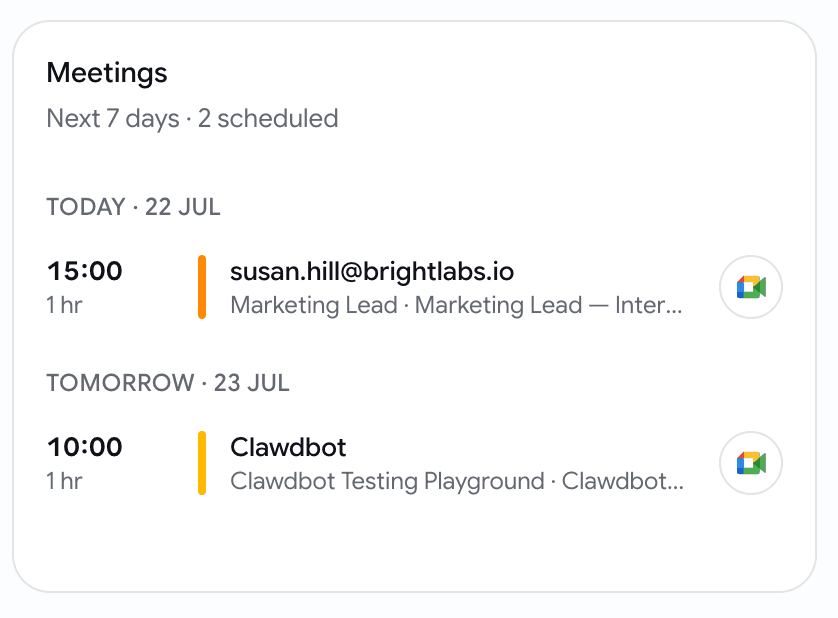
- The week reads back on your dashboard: a Meetings card with the next 7 days, grouped by day, your team's interviews and not only your own, each with a one-tap join button. Nothing scheduled, no card.

Jobs
Read what your pipeline actually does to a candidate — before you publish
A four-stage pipeline tells you what each stage is. It never told you what the whole thing does — who gets filtered, at what score, and where they end up. Now there's a summary that says it in sentences.
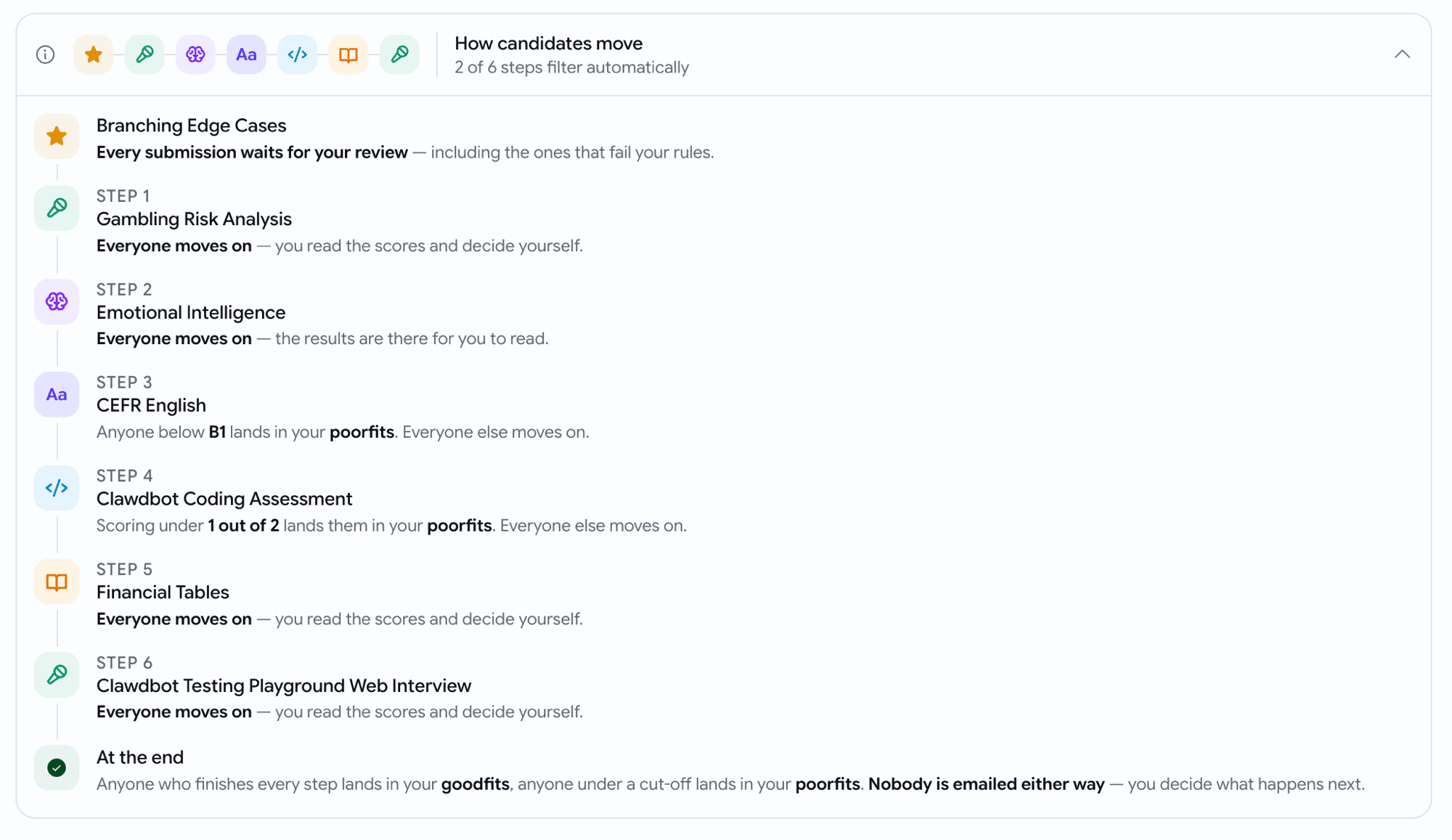
- A How candidates move strip sits under your stages: one tile per step, in order, so the journey reads left to right. Open it for the step-by-step version.
- Every line names the consequence — "Scoring under 12 out of 30 lands them in your poorfits. Everyone else moves on." — and closes with where a candidate who finishes everything ends up.
- Steps with a problem are ringed and counted in the headline. The one this was built for: a cut-off switched on but left at
0. The switch reads "On" and filters nobody, and until now nothing said so. - It updates as you type, so you can check your own understanding without publishing and watching real candidates.
Assessments
We check your assessment settings before you publish
A timer that looks fine next to a question count can still be far too short for the questions themselves — and the candidate is the one who finds out. Goodfit now does that arithmetic for you, before you save.
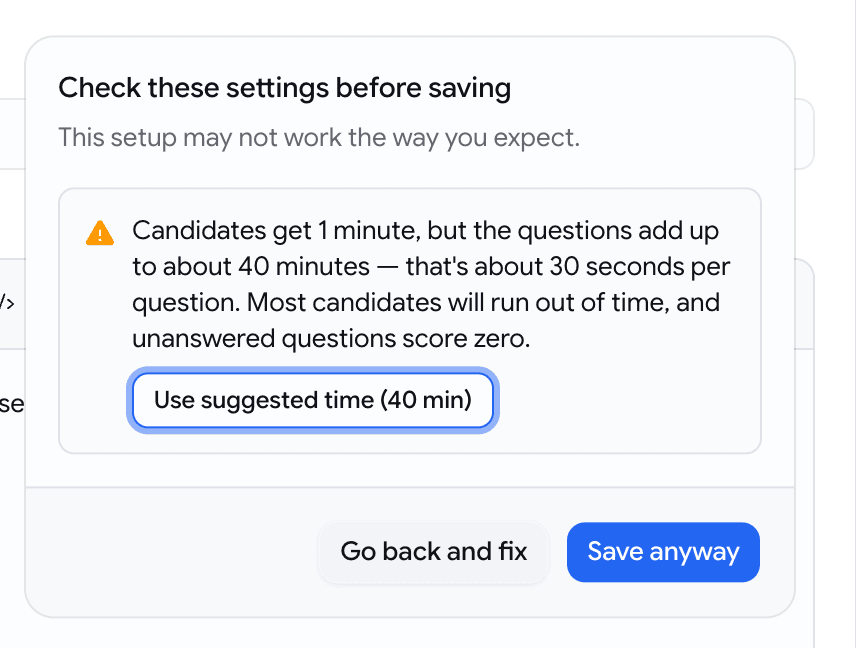
- Save or publish and anything that doesn't add up gets one dialog with the arithmetic spelled out —
Candidates get 1 minute, but the questions add up to about 40 minutes — that's about 30 seconds per question. - Timer far shorter than the questions need? Use suggested time (40 min) applies the right number and saves in the same click.
- Per-question times are judged by what you're asking for: 15 seconds to pick an option is fine, 15 seconds to record a video answer is not.
- A pass score of 100 (only perfection passes) or 0 (everyone passes) gets flagged too, in case it wasn't deliberate.
- Save anyway is always there. Only settings no candidate could ever take — a 0-minute timer, zero questions — are blocked outright, because there's nothing to confirm.
When your email sending breaks, hand the fix to whoever can actually do it
If your organisation sends candidate email from your own address and it stops working, candidates quietly stop receiving invitations. The person who notices is a recruiter. The person who can fix it holds the mail-server password. Now there's a route between them.
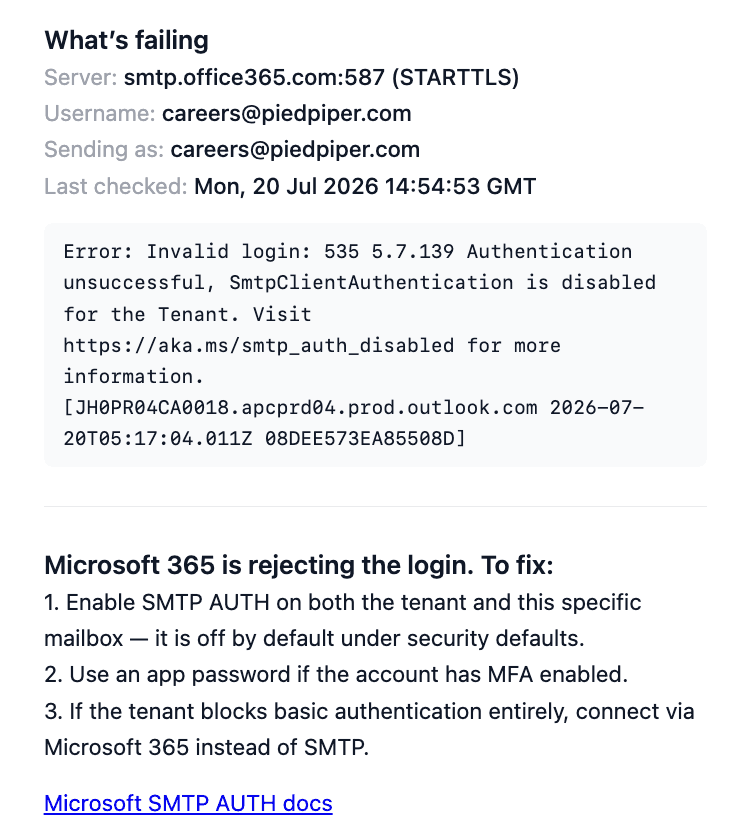
- Settings → Email shows a status card when sending is failing — and nothing at all when it's healthy, so the day it appears, it means something.
- The card names what actually broke and what to do about it. A wrong password and a server refusing to send now get different advice, instead of the same list of steps half of which don't apply.
- Send to IT emails your mail administrator the whole picture: the server, the username, the sending address, the exact error, and numbered steps to fix it.
- Pick a teammate from the list, or type any address — someone outside your team gets invited, and the invitation itself explains the outage rather than arriving as a bare "you've been invited".
Billing
Your signup credits now come with a 14-day clock
The 20 credits every new organisation starts with used to sit there forever. They now have a deadline, and you can see it counting down.
- The credit meter in your sidebar shows the days left alongside your balance — amber at three days, red on the last one.
- Two emails, no more: one warning three days out, one the day the unused credits go.
- Only what you haven't spent expires. Anything you've already used is untouched.
- Buy credits at any point and the clock stops for good — purchased credits never expire, and the countdown doesn't come back.
July Week 5
Send an assistant into your video interviews to record them, transcribe them and write up how the candidate did, collect every interviewer's verdict on one scale without asking anyone to log in, and run as many interview rounds with a candidate as the role actually needs. Plus a new browser extension that brings Goodfit into the job boards you already use — post jobs, import applicants and existing posts, and source from a LinkedIn profile, on Chrome to start.
July Week 2
Read every integrity signal for an assessment in one report with one verdict, catch candidates running an AI copilot in their browser, hand every candidate a different mix of coding questions, see the full history of who changed what on a job, and verify a candidate's ID straight from the government source with DigiLocker.