July Week 5
Send an assistant into your video interviews to record them, transcribe them and write up how the candidate did, collect every interviewer's verdict on one scale without asking anyone to log in, and run as many interview rounds with a candidate as the role actually needs. Plus a new browser extension that brings Goodfit into the job boards you already use — post jobs, import applicants and existing posts, and source from a LinkedIn profile, on Chrome to start.
- hiring
- interviews
- ai
- sourcing
- extension
Interviews
Send an assistant into your interviews so you can stop taking notes
Interviewing well and writing everything down at the same time is a trick nobody actually pulls off. One of them always gives. The Meeting Assistant joins your video interview, records it, transcribes it, and has a write-up waiting on the candidate's profile by the time you're out of the call.
- Works with Google Meet and Microsoft Teams. Nothing to install, and you don't have to connect your calendar for it to work.
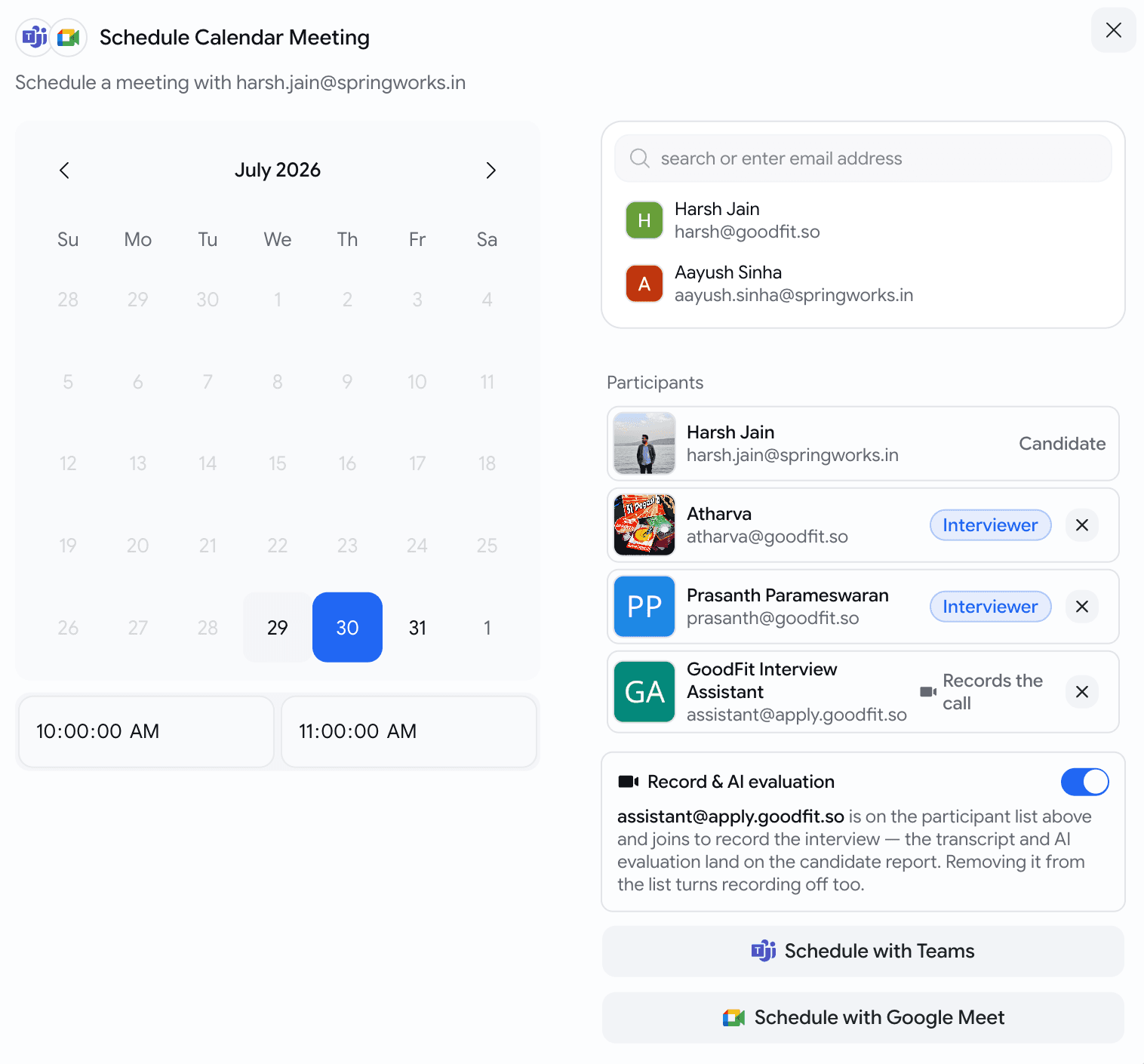
- Schedule an interview as you normally would and the assistant is already on the invite — you'll see Goodfit Interview Assistant sitting in the participant list next to your interviewers. It joins at the start time like anyone else.
- Recording is on by default. To skip it for one interview, switch Record & AI evaluation off or take the assistant out of the participant list — either one, they're the same switch.
- Forgot to include it, or the meeting was set up outside Goodfit? Invite
assistant@apply.goodfit.soto the calendar event exactly as you'd invite a colleague, and it will turn up. There's also Add meeting link to record on the candidate's card if you'd rather paste the Meet or Teams link. - The interview card tells you where things stand without you opening anything: Will record, Recording, Recorded, and — for the cases worth knowing about — Not admitted when nobody let it into the call, or Recording blocked when the meeting's own settings wouldn't allow it.
Interviews
The recording, the transcript and the write-up all in one place
Open the candidate and the interview card holds everything the conversation produced.
- The recording, playable in the browser or downloadable.
- The full transcript, with speakers separated. Click any timestamp and the video jumps to that moment.
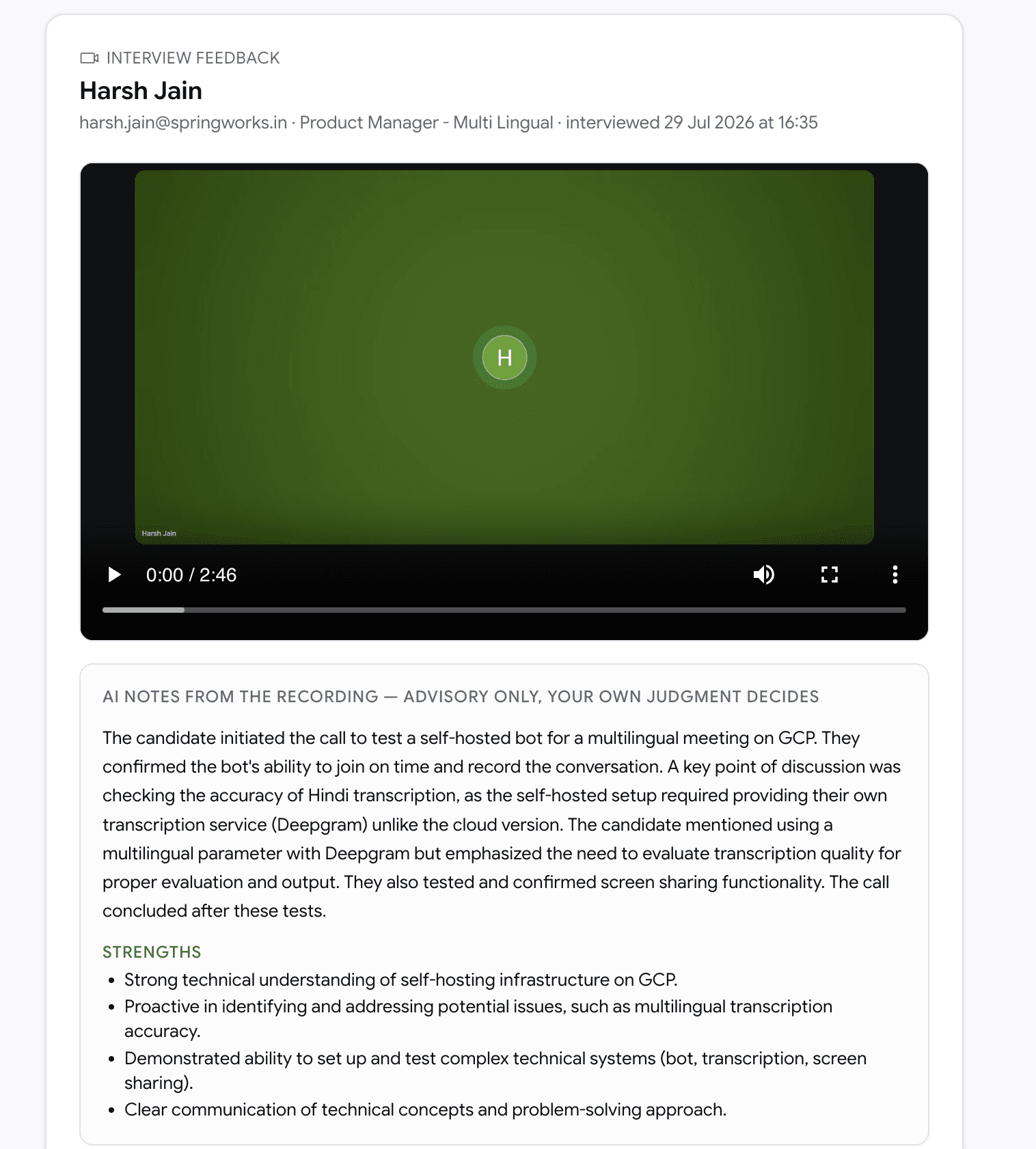
- An AI write-up: what was covered, how the candidate did against each competency with the reasoning behind every score, strengths, concerns, and anything worth a second look. Every claim carries the timestamp it came from — click it and the recording scrolls into view and plays from exactly there, so you can check the evidence yourself in about two seconds.
- Bilingual interviews transcribe properly now, rather than forcing the whole recording into one language.
Interviews
Every interviewer's verdict on one scale, with nobody logging in
Feedback that arrives as "yeah, decent" in three different chat threads isn't feedback you can compare. Now everyone answers the same question.
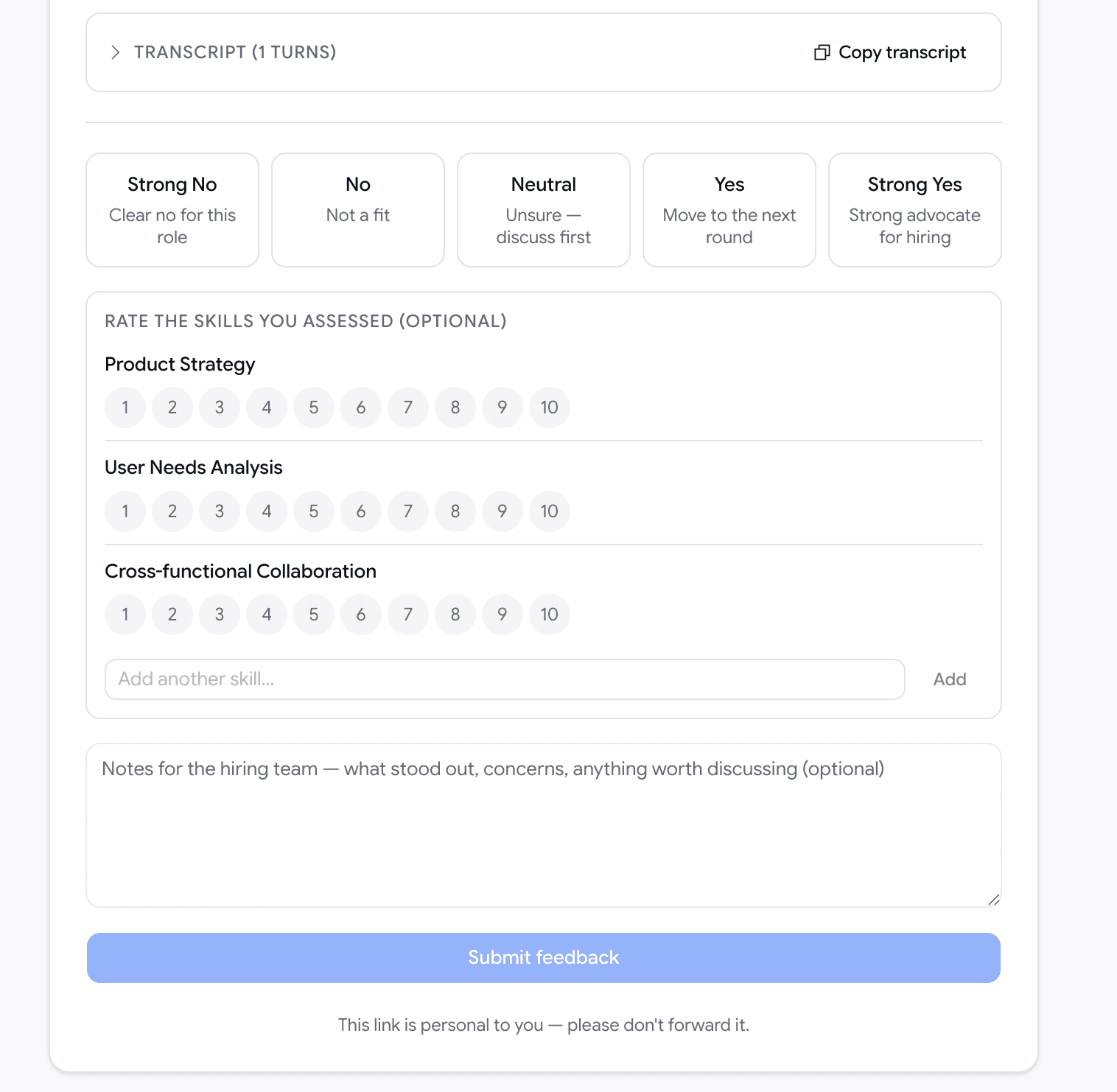
- After the call, everyone marked as an Interviewer gets an email with a private link: Strong No · No · Neutral · Yes · Strong Yes, plus per-skill ratings and notes. No account, no login — external panellists can use it too.
- Mark someone as an Observer while scheduling and they're left alone. Only the people who actually interviewed get asked.
- Every verdict lands on the candidate's profile next to the recording, so you can see where the panel agreed and where it didn't.
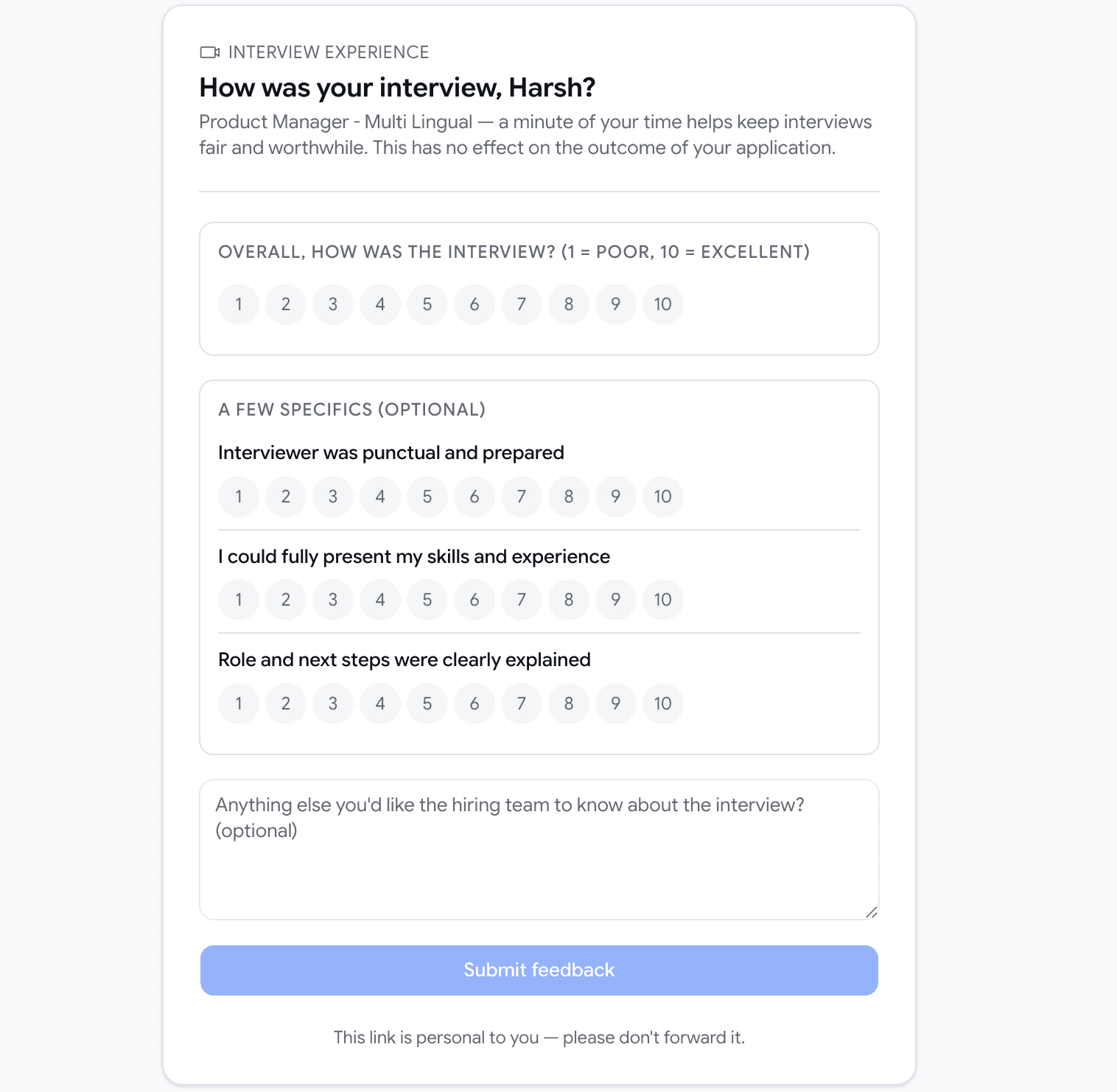
- Candidates get a short optional survey about how the interview felt — whether the interviewer was prepared, whether they got to show their skills, whether the role was explained. It has no bearing on their application, and they never see your notes, the recording or the write-up.
Interviews
Run as many rounds with a candidate as the role needs
A second interview used to quietly replace the first one. Two rounds meant losing the record of the round you'd already done.
- Schedule as many video calls with a candidate as you like. Each one gets its own card, its own recording, its own transcript, its own write-up and its own panel feedback — the earlier rounds stay exactly where they were.
- Moving a candidate between stages no longer cancels a booked interview or its recording. That includes rejecting or hiring them, which used to pull the interview out from under a call that was still going ahead. If a meeting shouldn't happen, cancel the meeting.
- Reschedule and the assistant follows the new time. Cancel the event and the recording is cancelled with it. Change the attendees and the update carries through.
Browser extension
Move jobs and candidates between Goodfit and the job boards you already use
Recruiting lives across half a dozen tabs, and most of the day is spent copy-pasting between them. The new Goodfit browser extension sits in those tabs with you: sign in once and your Goodfit jobs and candidates are right there on LinkedIn, Indeed and Wellfound.
- Sign in with your Goodfit account once — the same connection works across every supported board.
- Everything is started by you and only touches your own organization's data. No ads, no browsing tracking, nothing sold.
Browser extension
Post a job to a board without re-typing it
Open a board's "post a job" page and the form is already filled in from your Goodfit job.
- Pick a job in the extension, choose the board (LinkedIn, Indeed or Wellfound), and the posting form opens pre-filled — title, location, pay, job type and description.
- Review each step and submit it yourself. The extension never submits, sponsors or pays for a post on your behalf — you stay in control of publishing and budget.
Browser extension
Pull a job's applicants into Goodfit
On a board's applicants page, bring the candidates into a Goodfit job in one flow.
- Click Import applications to Goodfit, pick the organization and the job to import into (only active jobs are listed), choose a batch size, and go. Résumés are processed in the background.
- Rejected applicants are never imported, and imported candidates are tagged with the board they came from so you always know the source.
- Prefer to move faster than prospecting? Tick "Invite candidates (send Goodfit assessment) instead of adding as prospects" to send the assessment invite as you import.
Browser extension
Bring your existing job posts into Goodfit
Already have jobs live on a board? Import them instead of recreating them by hand.
- From the board's jobs list, tick the ones you want (there's a search box for long lists) and import them into Goodfit as drafts, ready for you to review before activating.
- Jobs you've already imported are skipped, so re-running is safe.
Browser extension
Add someone straight from their LinkedIn profile
Sourcing on LinkedIn? You don't need to leave the profile.
- On any LinkedIn profile, the extension shows whether that person is already a candidate in your account, so you don't re-add or re-contact the same person.
- Add them to a job as a prospect, or send them a Goodfit assessment invite — right from the profile.
August Week 2
Psychometric reports that carry a written behavioural profile, a read against the role you're actually hiring for, and where the candidate ranks against everyone else who took it. Plus your teammates' busy time inside the scheduling dialog, AI interviews in Japanese and Arabic, a connection check that stops doomed interviews before they start, candidate flow for every job, a seat for the agencies who source for you, and a jobs list that finally remembers how you use it.
July Week 4
Connect your own Google Calendar and book interviews without leaving Goodfit, read your whole hiring pipeline as a plain-English summary before you publish, get warned when an assessment's settings would cut candidates off, hand a broken email setup straight to the person who can fix it, and watch your signup credits count down.