May Week 1
Metered billing goes live, pipeline health waterfall, invitation expiry per job, AI Phone Interview as a standalone product, sharable reports, and more.
- billing
- insights
- phone-interview
- voice
- reports
- filters
- proctoring
Billing
Metered billing is live for new customers
Pay-as-you-go billing now powers every new company on GoodFit.
- Every organization created on or after Saturday, 25 April 2026 is on metered billing
- 20 free credits to start with — no card required
- One credit per assessment (coding, voice, phone, psychometric, skills)
- Top-ups available at ₹100 + GST per credit, minimum 100 credits per purchase
Insights
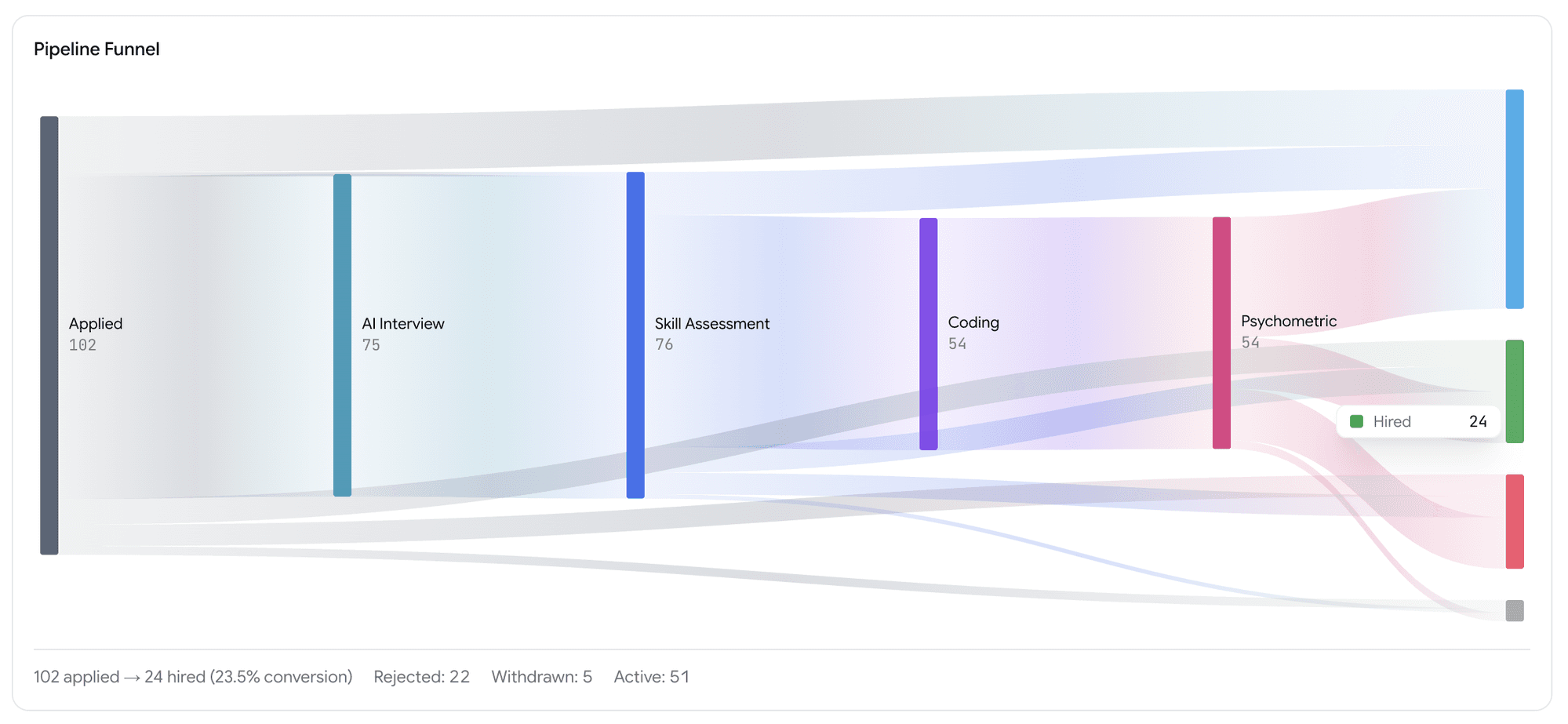
Pipeline Health — drop-off waterfall
See exactly where candidates drop off in your hiring funnel.
- Pipeline Health view under Insights
- Waterfall chart showing how many candidates moved from one stage to the next
- Final conversion to Hired or Rejected at a glance
- Spot the stage that's leaking the most candidates
Jobs
Invitation expiry per job
Invitations now have a shelf life.
- Default expiry: 3 months from the day the invitation is sent
- Configurable per job — minimum 1 hour, maximum 1 year
- Once a candidate starts the interview, the expiry no longer applies — they can finish at their own pace
- Invitation emails now show the deadline ("Please respond by DD MMM YYYY")
- Expired invitations show a red Expired pill on the Kanban tile
- Re-inviting a candidate resets the clock.
Assessments
AI Phone Interview is now a separate product
AI Interview is now split into two clear products at every step.
- AI Web Interview — candidate joins from a browser link
- AI Phone Interview — our bot calls the candidate directly on their phone
Phone interview rules
- A phone-interview job can only have phone-interview stages — no other stages can be added before or after
- No application form can be attached to a phone-interview job
- For public jobs, candidates pick the date and time they want to be called — right on the job page
Voice
Multiple questions per competency
Voice interviews can now go deeper on each competency.
- One voice interview can have multiple competencies
- Each competency can have multiple primary questions plus their follow-up questions
- Each primary and follow-up question carries its own ideal response for the AI to score against
Reports
Sharable reports with privacy controls
Reports are now private by default. Share deliberately, share safely.
- Reports can no longer be viewed publicly unless you generate a Share URL
- Choose who can see a shared report:
- Specific people by email
- Specific company domains (e.g. anyone at
@yourcompany.com) - Fully public link
- Toggle visibility on or off any time
Per Share URL, you can configure:
- General access — who's allowed to open the link
- Link expiry — set a date when the link stops working (or "No expiry")
- Hide from viewers — pick what to redact from the report:
- Hide candidate PII — name, email, phone, location, photo
- Hide screening form responses
- Hide internal evaluations (scorecards, hiring-manager notes)
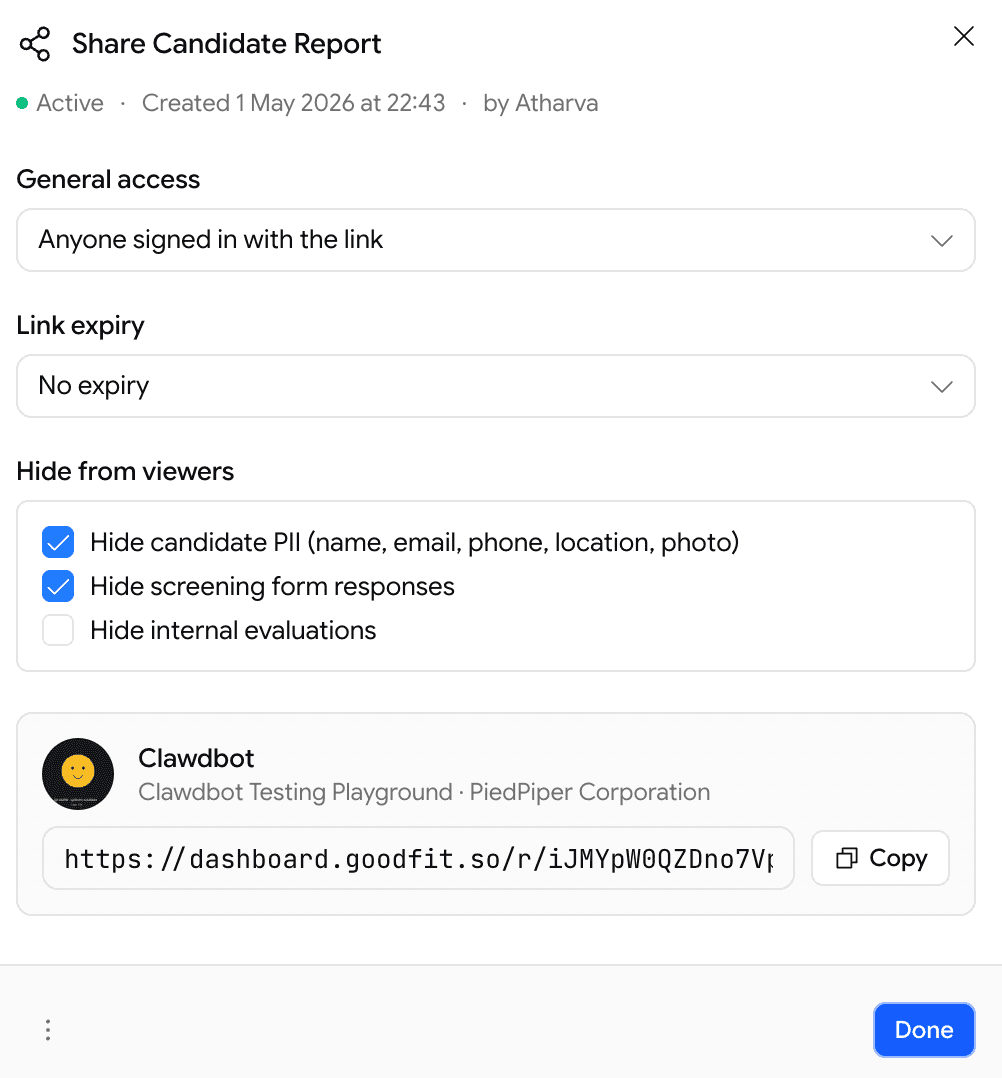
Useful for blind reviews, external interview panels, or sharing with clients without leaking your private notes.
Hiring
Softer rejection at the finish line
Candidates no longer see a harsh rejection screen when there's nothing left to evaluate.
- If a candidate falls below the cutoff at the last stage — or if everything left is a psychometric, they finish the pipeline normally and see the same completion screen as anyone else
- Recruiters still see the truth on the Kanban board — the candidate still lands in Poor Fits with the real score
- No change for failures earlier in the job stages pipeline — those still show the rejection screen as before
Proctoring
Relax the coding editor for low-stakes runs
A new per-assessment toggle: Disable Editor Locking.
- Off (default) — strict editor: no copy/paste, no right-click, no autocomplete. Same as before.
- On — relaxed editor: copy/paste, IntelliSense, right-click, command palette all work normally
Useful for when the standard lockdown feels too aggressive.
May Week 2
Score candidates inside application forms, branch questions based on earlier answers, preview psychometric frameworks before assigning them, see if a bad voice interview was a bad connection, flag suspicious reports, and inline help on every page.
April Week 4
Accent controls for voice interviews, unified application & pre-screening, salary and equity ranges, resume evaluation filters, and onboarding.